

Every shipment starts with something arriving in a mailbox. A rate request. A booking confirmation. A commercial invoice. An arrival notice. A revised carrier invoice that replaces the one from last week.
Someone reads it. Someone works out which shipment it belongs to. Someone decides what to do about it. Then someone types the result into the transportation management system.
That chain of reading, matching, deciding and typing creates repetitive work in a customs brokerage or freight forwarding office. As volume grows, the workload grows with it.
Deep Cognition introduces Traffic Desk, the intake layer of Agentic TMS.
What Is Traffic Desk?
Traffic Desk is an AI intake layer that sits between the shared inbox and the transportation management system (TMS) a freight forwarder or customs broker already runs. It reads incoming emails and attachments, identifies their intent, matches them to the right shipment, and drafts the next action with supporting evidence. A person approves at a gate. The reviewed result is written back through the configured integration to the TMS, which stays the system of record. Traffic Desk is part of Agentic TMS by Deep Cognition and runs alongside existing freight forwarding software and customs broker software rather than replacing it.
What Is an Agentic TMS?
An agentic TMS is a transportation management system in which AI agents carry out routine work across shipment steps, including quote, booking, export, tracking, customs, delivery and billing, while people make consequential decisions. The agents read inbound communications, prepare actions and write reviewed data back. Actions are logged for human review. Agentic TMS from Deep Cognition uses this approach, and Traffic Desk is its intake layer: the part that reads what arrives and prepares the next action.
Why Document Extraction Was Not Enough
PaperEntry AI provides document intelligence for customs processing. Traffic Desk builds on that foundation by connecting extracted data with shipment context and a proposed action.
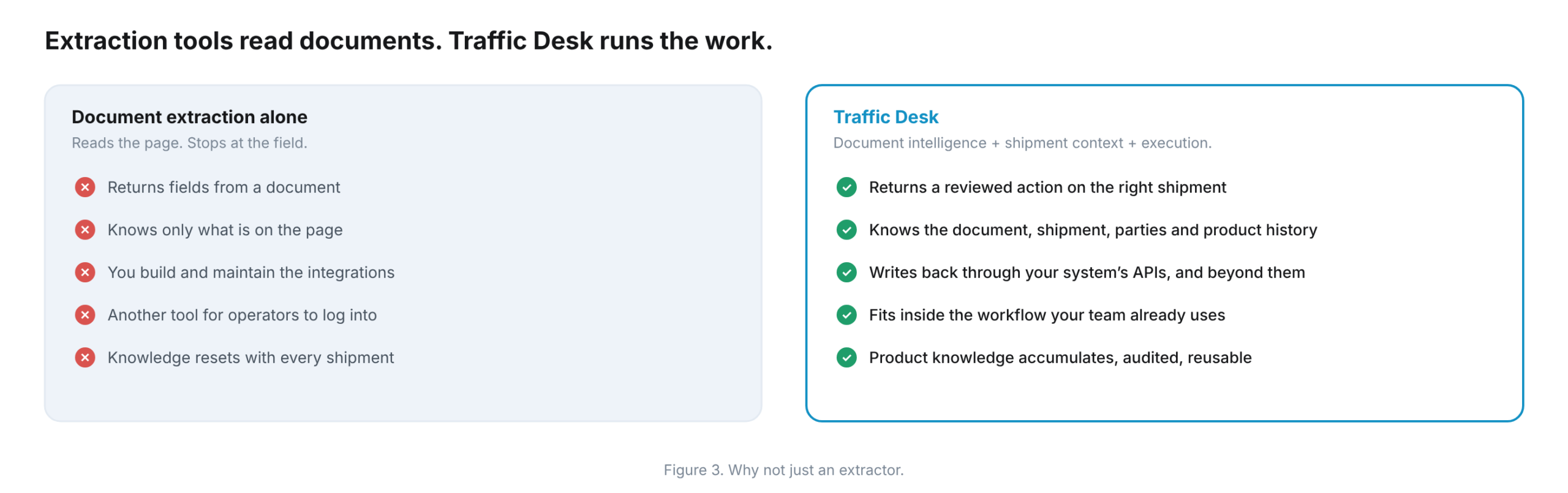
Extraction alone stops at the field. It can return values from an invoice while leaving the rest to a person. Someone still has to find the job, check whether the invoice is new or a revision, look up what the team knows about the product, decide what to do, and enter the result in the TMS.
Traffic Desk combines the document, the shipment, the parties and the product history. It prepares an action on the relevant shipment, not just a list of fields.
Extraction tools hand back data. Traffic Desk prepares an action for review.
How Does Traffic Desk Work?
Traffic Desk follows six intake steps. Human-in-the-loop AI keeps correction and approval in the workflow instead of treating them as an afterthought.
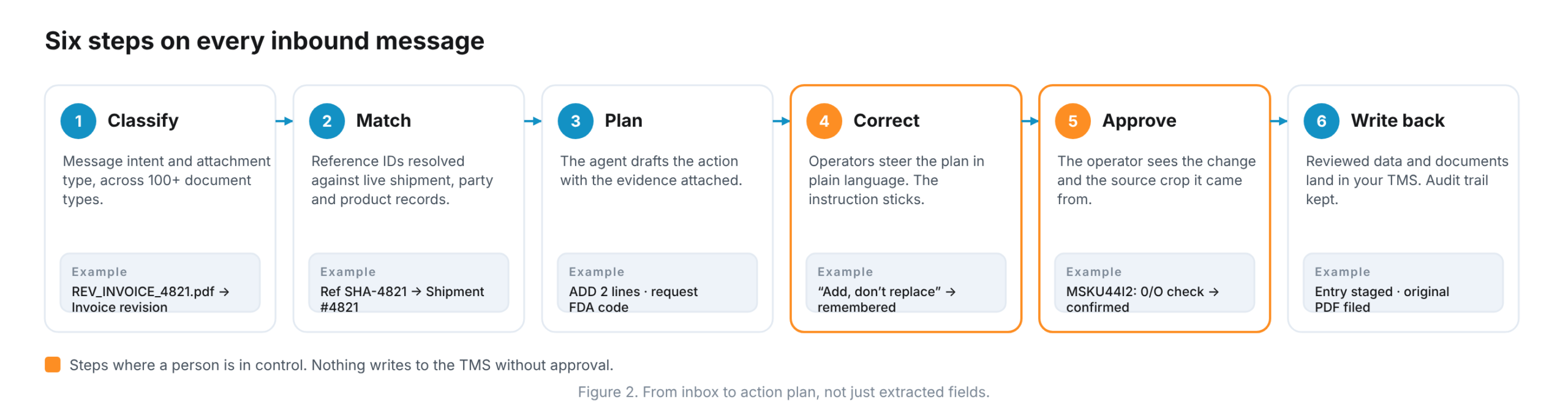
- Classify. It identifies the intent of the message and the type of each attachment, across more than 100 document types. Classification distinguishes variants such as rated arrival notices and pre-arrival notices.
- Match. Reference numbers are resolved against shipment, organization and product records. The communication is linked to the relevant shipment for review.
- Plan. The agent drafts the action: update this job, add these two lines, request the missing FDA code for this SKU. Supporting evidence is attached.
- Correct in Plain Language. “Assign it to the other shipment.” “Add, do not replace.” The operator steers the plan with an instruction, providing context for similar cases.
- Approve at the Gate. The operator sees the proposed change and source evidence showing where values came from. Uncertain values can be reviewed against the original document rather than accepted without inspection.
- Write Back. Reviewed data and original documents are sent to the TMS and document repository through the configured integration. The audit trail records the approval and supporting evidence.
Inbound mail often changes an existing shipment rather than creating a new one. Traffic Desk treats a revised invoice as a revision. Lines are added or replaced according to the importer’s configured rules rather than a default overwrite.
Who Is Traffic Desk For?
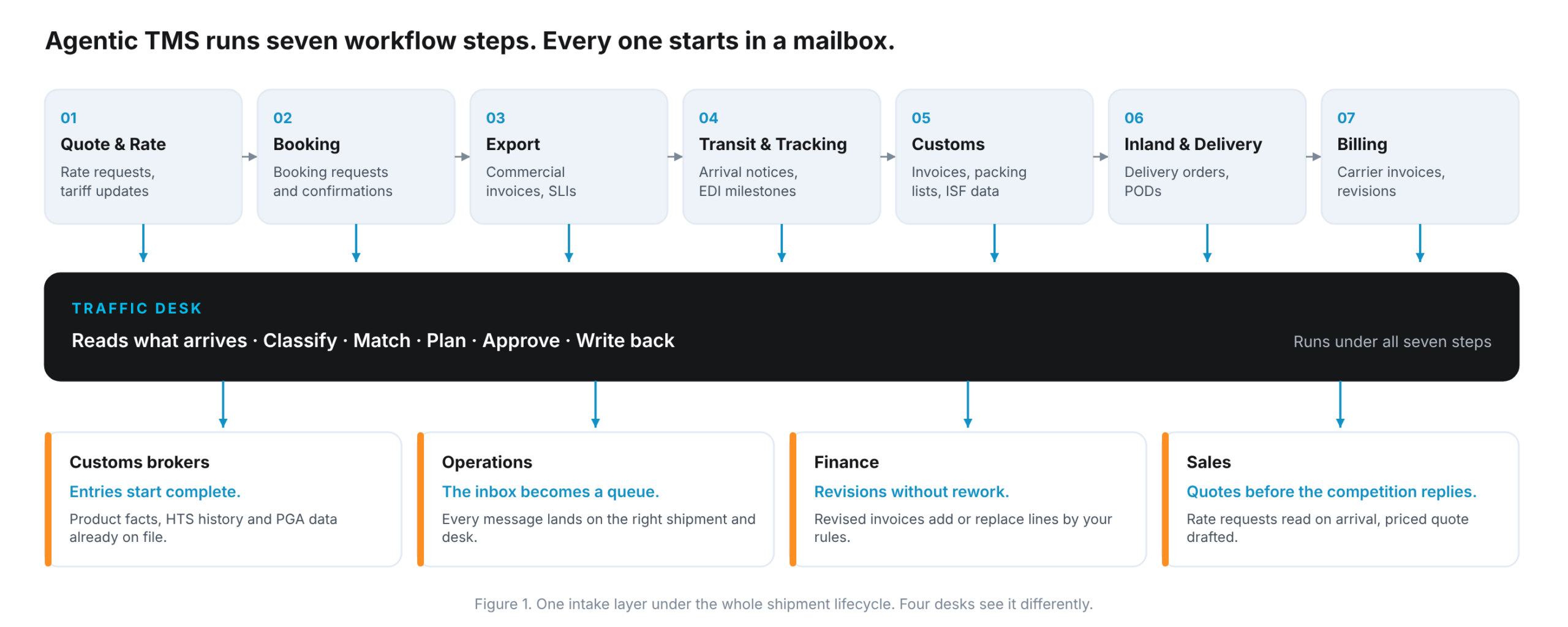
Agentic TMS connects seven workflow steps, from quote to billing. Each receives communications and documents, so Traffic Desk provides intake across the lifecycle. It supports different priorities for each desk.
Customs Brokers
Entries start with reviewed product facts, HTS history and Partner Government Agency (PGA) data already on the product record where available. HS Code Assist proposes an HTS classification with supporting reasoning for broker review. The Harmonized Tariff Schedule and its General Rules of Interpretation provide the classification framework. The licensed broker decides, and the reviewed decision can be stored on the product for reuse. Missing information is surfaced before submission.
Operations
The inbox becomes a work queue. Messages are linked to shipments and routed to the responsible desk with a proposed next step. Work needing a decision is visible, while approved tasks can proceed under the configured workflow.
Finance
Revised carrier and vendor invoices add or replace lines according to your rules. Changes retain their source and approver, supporting invoice review and shipment-level comparison. The freight audit and reconciliation scope should be confirmed during evaluation rather than assumed to cover every finance process.
Sales
Rate requests are read on arrival. Available contract rates can be looked up and a priced quote drafted for review, helping freight quoting keep pace with the inbox.
What Makes Traffic Desk Work?
Product Catalog
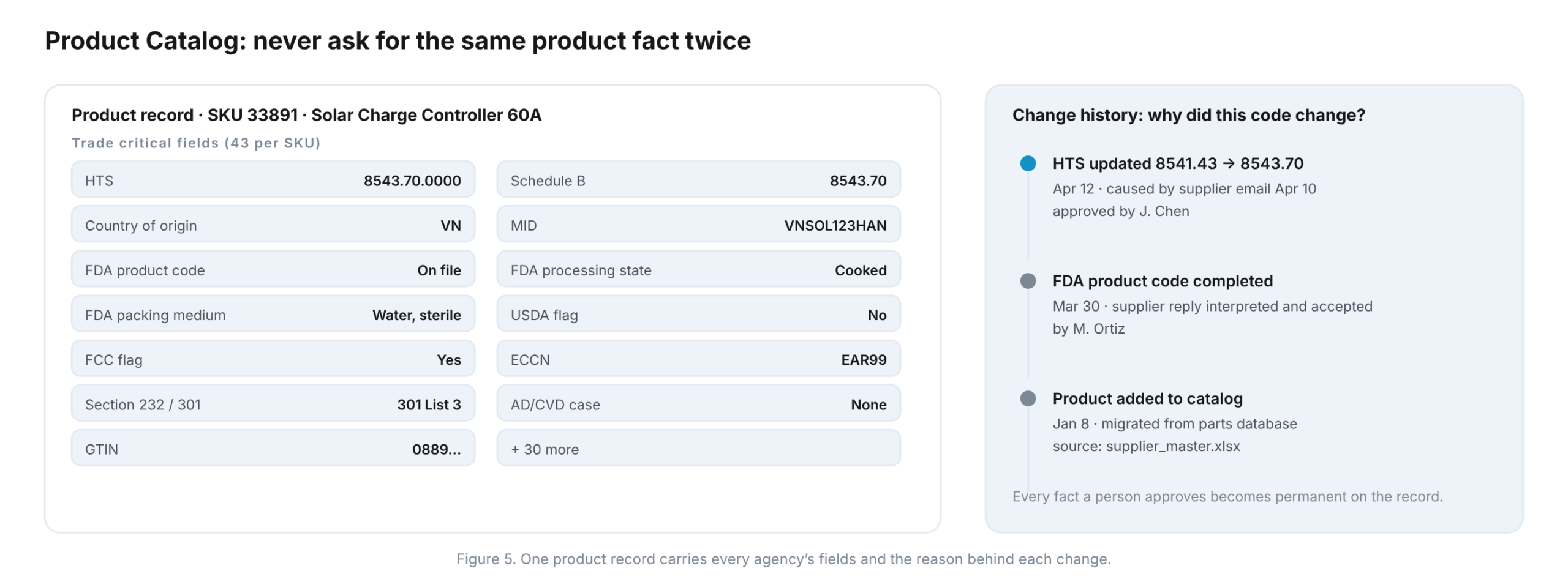
Product Catalog keeps importer and supplier parts information current. Product records hold trade-critical fields such as HTS, country of origin, MID, FDA product-code information and relevant PGA fields. Existing parts databases can be migrated with source attribution, and reviewed updates retain their change history.
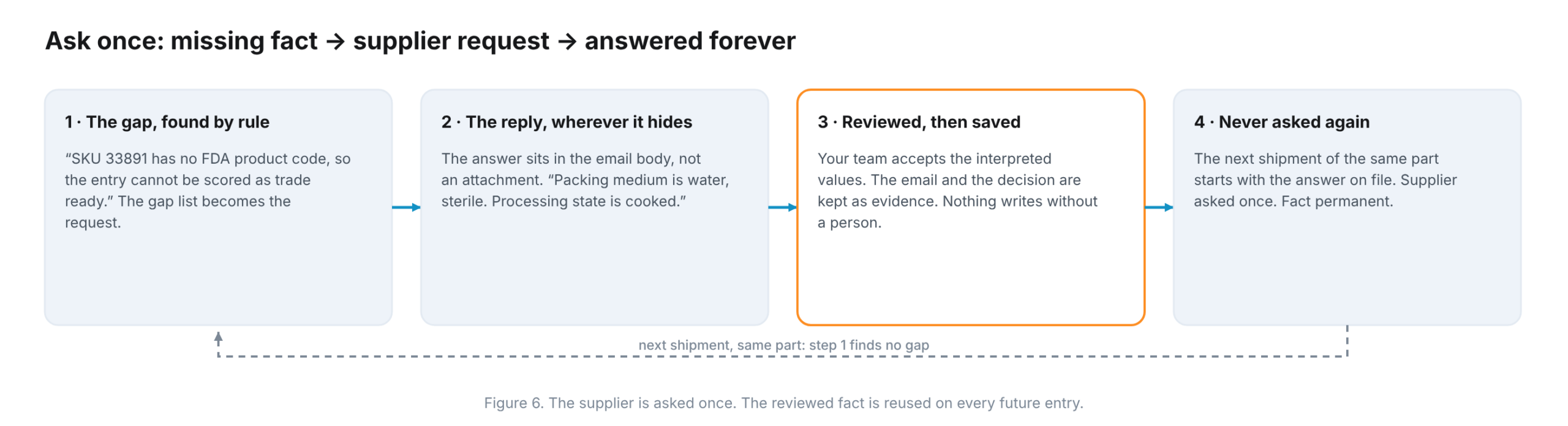
When a document does not state a required fact, Traffic Desk can prepare a supplier-information request. A person reviews the response before the fact is saved. The next shipment of the same part starts with the reviewed answer on file, subject to updates when the product information changes.
Work Routing
Traffic Desk uses configured branches, teams and roles to route each classified task to the responsible person. Connected leave and availability information can support cover rules. Managers can review workload, exceptions and escalations in the workbench.
Compliance Hub
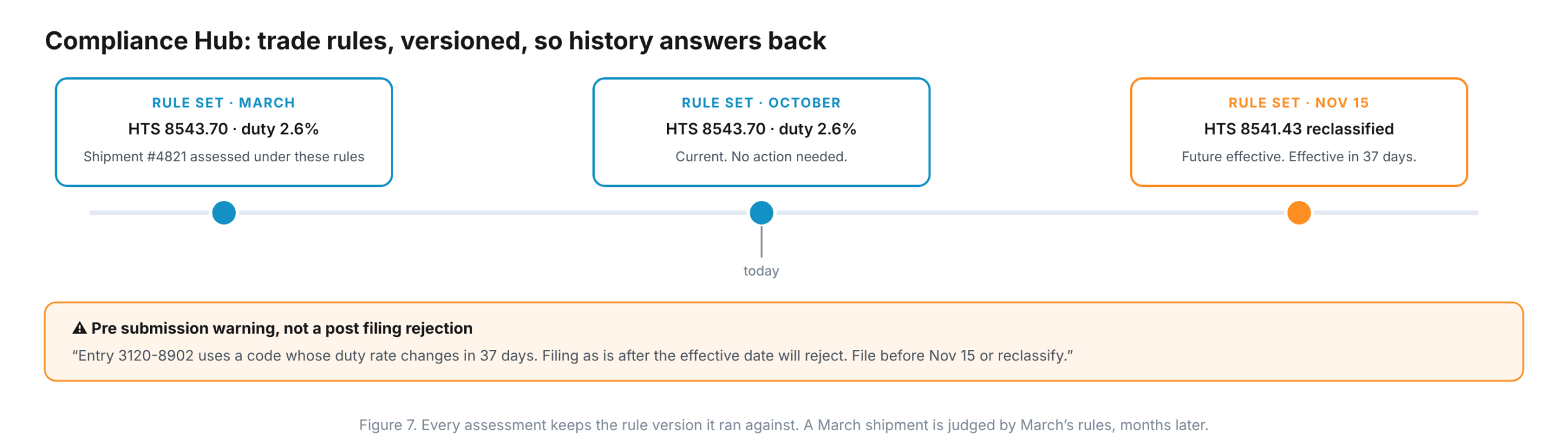
Compliance Hub supports trade compliance review within Traffic Desk. Regulatory information, including CBP Cargo Systems Messaging Service (CSMS) messages, is assessed alongside shipment and product facts to surface issues before filing. Versioned assessments help explain which requirements were used at the time.
Compliance review can include antidumping and countervailing duties (AD/CVD) and Uyghur Forced Labor Prevention Act (UFLPA) considerations. Screening modules and data sources should be confirmed for the implementation. Uncertainty requires review, and an automated warning is not a guarantee of government acceptance. Existing screening can remain in the TMS where appropriate.
How Does Traffic Desk Integrate With an Existing TMS?
No rip-and-replace. Traffic Desk reads what arrives, prepares the work, and writes the reviewed result back through configured TMS integration paths. Where a TMS exposes a suitable API, that interface can be used. Where an operation has no API, learned UI automation can support the screen-based workflow. Confirm access, supported operations and approval rules for your system during evaluation.
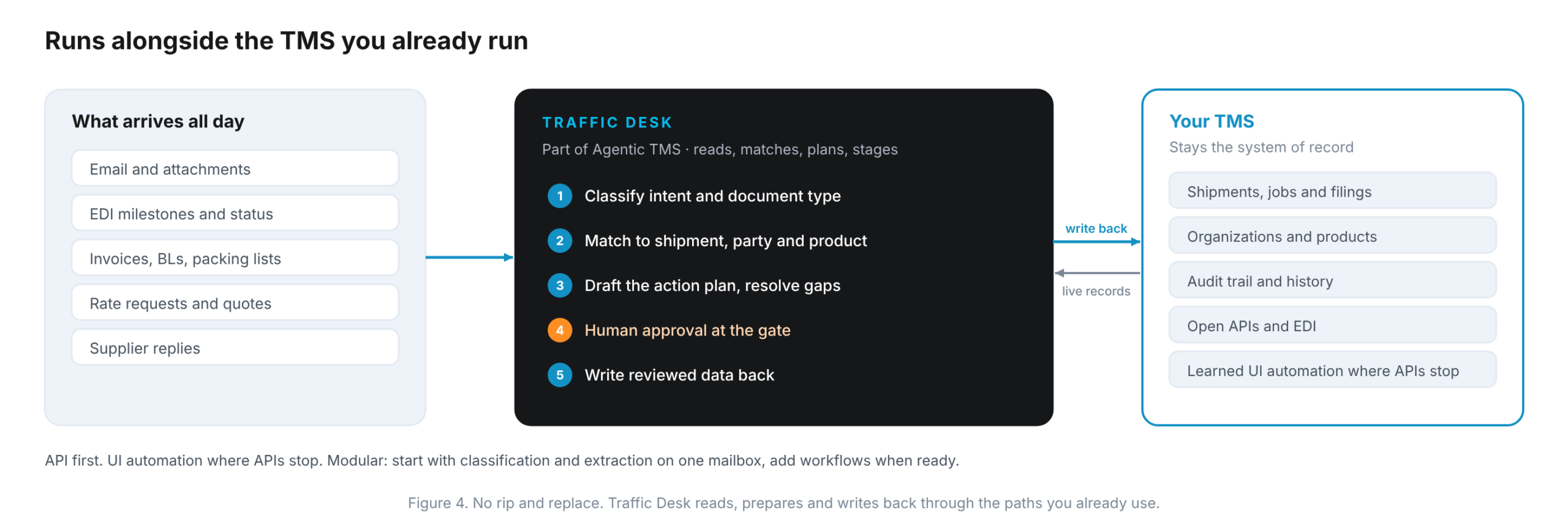
The approach is modular. Start with classification and extraction on one mailbox. Add workflows when the results and business requirements justify it. See Agentic TMS integrations for more information.
Is Customer Data Kept Separate?
Customer product catalogs can contain proprietary client information. Traffic Desk uses customer workspaces and access controls to keep that information within the appropriate account. Confirm data handling, isolation, model-service use, retention and contractual requirements during your security review. Deployment arrangements should be agreed for your implementation rather than assumed from a general product description. See Deep Cognition’s Security and Trust information.
See It Run on Your Own Files
Bring representative documents and your own evaluation criteria. Accuracy and workflow outcomes should be measured on your files in a test environment before anything touches production, not treated as an industry-wide guarantee.
Start with one mailbox. Keep your system of record. Expand when the results justify it.
Book a Traffic Desk walkthrough to discuss your workflow, integrations and evaluation criteria.
Frequently Asked Questions
What Is Traffic Desk?
Traffic Desk is the AI intake layer of Agentic TMS by Deep Cognition. It reads inbound emails and attachments, matches them to the relevant shipment, and drafts the next action for a person to approve. Reviewed data is written back through the configured integration to the TMS the team already runs.
Does Traffic Desk Replace My TMS?
No. Your TMS stays the system of record. Traffic Desk runs alongside it, reads incoming communications, prepares the work and returns reviewed data through configured integrations. API access and any screen-based automation are scoped to the operations your implementation needs.
Does AI File the Customs Entry?
Traffic Desk prepares information and proposed actions for human review. A licensed broker remains responsible for classification and filing decisions under the configured approval process. The system records supporting evidence and approvals. It should not be treated as a guarantee of regulatory clearance or a replacement for customs judgment.
What Is the Difference Between Document Extraction and Traffic Desk?
Document extraction returns fields from a page. Traffic Desk adds shipment and product context, drafts an action with evidence attached, and writes the reviewed result into the configured TMS workflow. Operators receive a proposed next step, not only a set of extracted values.
Which Teams Use Traffic Desk?
Traffic Desk supports customs brokers, operations, finance and sales. Their workflows include product-data review, shipment communications, invoice revisions and rate requests. Teams can start with one use case and expand as the required integrations and approval rules are established.
How Is Trade Compliance Handled?
Compliance Hub brings regulatory information together with shipment and product facts to flag issues for review before submission. Assessments retain rule-version context. Screening scope and sources depend on the implementation, and existing checks can remain in your TMS. Broker review remains essential.
How Is Traffic Desk Deployed and Is My Data Shared?
Deployment and data handling are agreed during solution and security review. Customer workspaces, role-based access and audit history support controlled use of business information. Confirm isolation, retention, model-service handling and any customer-hosted requirements with Deep Cognition before production rollout.
How Do I Start?
Start with one mailbox and a defined workflow in draft-and-approve mode. Measure classification, extraction, matching and proposed actions against your own acceptance criteria. Confirm integration and data requirements before expanding. Book a demo to plan the evaluation.