Home · Products · Agentic TMS · How It Works

How the Platform Works

Run a modern freight-forwarding desk with an AI agent fleet at your side. Agents recommend and prepare the work; you approve the decisions that matter and set how far agents can go on their own.

The operating principles

What Makes It Different

You Approve at the Gate

An agent can stage the quote, the booking, or the entry, but the consequential call stays with a person. How much an agent may do on its own is a setting you control.

L1ManualL2AssistL3DraftL4ApproveL5AutoAUTONOMY LEVEL

Practice Safely

A built-in Training sandbox and Demo mode let your team rehearse realistic scenarios with synthetic data. Nothing you do there touches production.

Synthetic
Documents
Training
Sandbox
Production
Data
Data flows into the sandbox only. Nothing you practice there reaches production.
Workspaces & applets

One Shared Operation, Many Desks

After you sign in, you pick a workspace, a company or branch context. Inside it you get a dashboard of applications (the platform calls them applets). Each app is a focused tool, but they share the same shipments, organizations, and documents underneath.

The flagship Agentic TMS My Desk pulls every desk into a single view. Most daily work happens there, and the individual apps are the detailed views behind it.

Orchestration

Orchestration: One Command Center, Every Agent’s Status

Every agent reports into the Command Center: live status across every open shipment, the autonomy setting for each agent, and disruptions flagged before they become a cost. It’s what makes the agent fleet behave like one accountable system instead of a set of disconnected tools each running its own workflow.
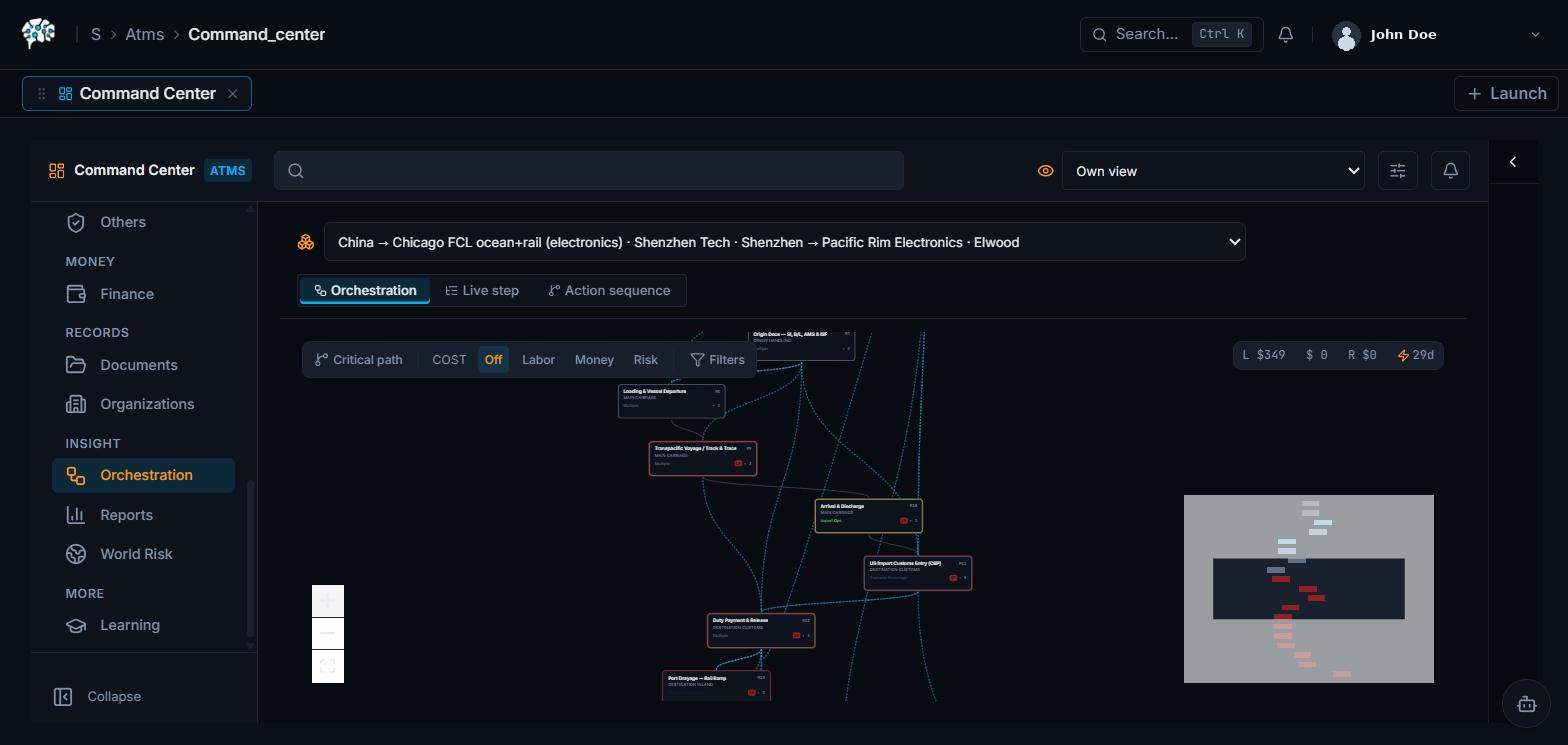
Agentic TMS Command Center with Approval Inbox, Agent Advisor, batch decision panel, and SLA buffer alerts
Autonomy

The L1 to L5 Model: You Set How Far Agents Go

Every kind of action has an autonomy level that decides how much the agent may do without you. Admins set these, and a rule engine can override them for specific situations.

LevelNameWhat happens
L1ManualThe human does the work; the agent stays out of the way.
L2AssistedThe agent suggests, the human does the action.
L3SupervisedThe agent prepares and proposes; the human approves at a decision gate before it fires.
L4AutonomousThe agent acts on its own; the human can watch and intervene.
L5Full AutoThe agent handles it end to end, no human step.

The Decision Gate

The decision gate is the moment an agent pauses and asks a human to approve an important choice: which carrier, whether to pay an invoice, whether to release a hold. Approvals you owe show up in the Approval Inbox.

“The advisor recommends but resolves nothing. The desk owner accepts at the gate.”
Exceptions & decisions

Exceptions & Decisions: One Queue, Not Six Alerts

A rolled booking, a denied-party hit, a rate variance, a low-confidence document field: every exception any agent surfaces lands in one queue instead of scattered alerts across email, chat, and dashboards. Each item carries what happened, what the agent recommends, and what’s at stake if it’s wrong, so whoever’s on the hook isn’t starting from a blank screen.

SLA buffer alerts surface the same way, before a carrier rollover or a demurrage clock becomes the thing you’re explaining to a customer.

Sandbox & demo

Rehearse Safely Before You Go Live

The platform can run against real operations (Live) or against deterministic synthetic data for safe practice.

Training Sandbox

Realistic, repeatable scenarios for each role, with synthetic data that never touches production.

Demo Command Center

A pre-flight that verifies a “golden path” will run cleanly before you present to a customer.

Safe to explore: anything labeled “Simulation / demo-safe” or “Training mode” uses synthetic files and does not affect production data.
The data model

Everything Attaches to the Shipment

A shipment is the central record. Around it sit the parties (organizations), the commercial quote, the carrier booking, the customs filings, the documents, and finally the invoices.

How it all works

How Agentic TMS Is Put Together

Everything that arrives feeds one shipment record; agents do the work on the left, your team approves at the gates on the right, every role gets its own view, and your TMS stays the system of record.

What Arrives All Day
Customer emails & RFQsCarrier confirmationsShipping documentsTracking & status updates
AI Agent Teamthe grunt work, supervised
  • Read requests · draft quotes
  • Prepare carrier bookings
  • Chase confirmations & documents
  • Check customs filings · match invoices
One Shipment Recorda single living record, every desk
Inquiry → QuoteBookingCustomsDeliveryInvoicing & reconciliation
Audit trail: every human & agent action logged
autonomy set per taskdraft-&-wait ◄▬▬▬▬▬▬► auto-in-bounds
Your Teamdecision gates, the judgment calls
  • Which carrier to book
  • Whether to release a hold
  • Whether to approve a payment
One Record · A View Per Role
Coordinatorrisk-ranked queueCustoms Brokerfilings cross-checkedPricing Specialistrates + margin in one viewFinance Leadexceptions, not line items
How Agentic TMS is put together: everything that arrives feeds one shipment record; agents do the work on the left, your team approves at the gates on the right, every role gets its own view, and your TMS stays the system of record.
Frequently asked questions

Frequently Asked Questions

What is the decision gate in Agentic TMS?

A decision gate is the point where an agent stops and asks a person to approve something consequential, like which carrier to book or whether to release a hold. The agent prepares the option; a human makes the call.

How does an Agentic TMS reduce manual data entry?

Agents read inbound emails, documents, and carrier updates directly, extracting and structuring the data before a person opens anything. Work that used to mean re-keying a document into a TMS instead arrives already entered, with a human reviewing rather than typing.

How does the approval workflow work in Agentic TMS?

Pending approvals land in one Approval Inbox, each showing what the agent recommends, its confidence, and what’s at stake. A person accepts, rejects, or amends from that single queue instead of hunting across email, chat, and separate dashboards.

What is a unified workspace or “My Desk” view in a TMS?

A unified workspace pulls every application, quoting, booking, customs, finance, into one home view built around the shipments a person actually works on, instead of requiring separate logins or screens per function.
Ready when you are

See It Run Your Operation

Explore the platform in a safe Training sandbox, or book a walkthrough with our team.